This tutorial shows how to handle JSON body data of HTTP PATCH request in Spring MVC.
Example
The controller
package com.logicbig.example;

import org.springframework.beans.factory.annotation.Autowired;
import org.springframework.stereotype.Controller;
import org.springframework.ui.Model;
import org.springframework.web.bind.annotation.*;

@Controller
@RequestMapping("/articles")
public class ArticleController {

    @Autowired
    private ArticleService articleService;

    @PatchMapping(value = "/{id}")
    @ResponseBody
    public String patchArticle(@RequestBody Article article) {
        articleService.updateArticle(article.getId(), article.getContent());
        return "Article updated.";
    }

    @GetMapping(value = "/{id}")
    public String getArticle(@PathVariable("id") long id,
                             Model model) {
        Article article = articleService.getArticleById(id);
        model.addAttribute("article", article);
        return "article-form";
    }
}
package com.logicbig.example;

public class Article {
    private long id;
    private String content;

    public Article() {
    }
    .............
}
JSP Pages
src/main/webapp/WEB-INF/views/article-form.jsp<html>
<head>
<script src="https://ajax.googleapis.com/ajax/libs/jquery/3.3.1/jquery.min.js"></script>
</head>
<body>
<h3>HTTP PATCH request with JSON Body Example</h3>
<form id="article-form">
<pre>
id: <input type="text" name="id" value="${article.id}" readonly>
content: <input type="text" name="content" value="${article.content}">
<input type="submit" value="Submit">
</pre>
</form>
<br/>
<div id="result"></div>
<script>
$("#article-form").submit(function(event){
event.preventDefault();
var form = $(this);
var idVal = form.find('input[name="id"]').val();
var contentVal = form.find('input[name="content"]').val();
var url = 'http://localhost:8080/articles/'+idVal;
var jsonString = JSON.stringify({id: idVal, content: contentVal});
console.log(jsonString);
$.ajax({
type : 'PATCH',
url : url,
contentType: 'application/json',
data : jsonString,
success : function(data, status, xhr){
//refresh the current page
location.reload();
},
error: function(xhr, status, error){
alert(error);
}
});
});
</script>
</body>
</html>
Additional JSON dependency
pom.xml<dependency>
<groupId>com.fasterxml.jackson.core</groupId>
<artifactId>jackson-databind</artifactId>
<version>2.9.2</version>
</dependency>
Java Config
package com.logicbig.example;

import org.springframework.context.annotation.Bean;
import org.springframework.context.annotation.ComponentScan;
import org.springframework.context.annotation.Configuration;
import org.springframework.web.servlet.ViewResolver;
import org.springframework.web.servlet.config.annotation.EnableWebMvc;
import org.springframework.web.servlet.config.annotation.WebMvcConfigurer;
import org.springframework.web.servlet.config.annotation.ViewResolverRegistry;
import org.springframework.web.servlet.view.InternalResourceViewResolver;

@EnableWebMvc
@Configuration
@ComponentScan
public class MyWebConfig implements WebMvcConfigurer {

    @Override
    public void configureViewResolvers(ViewResolverRegistry registry) {
    registry.jsp("/WEB-INF/views/", ".jsp");
    }
}
Running App
To try examples, run embedded Jetty (configured in pom.xml of example project below):
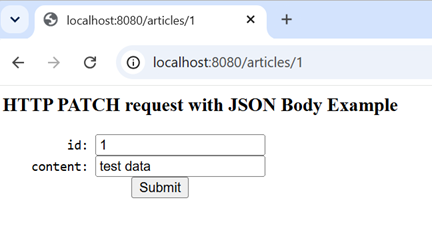
mvn jetty:run Accessing http://localhost:8080/articles/1 :
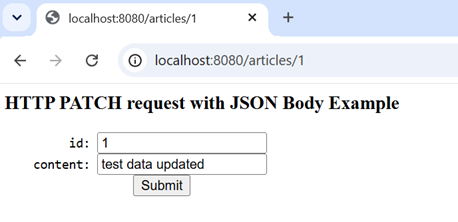
Editing the content form field and submitting the form will refresh the form with updated content:
Using curl
$ curl -s -X PATCH "http://localhost:8080/articles/1" -H "Content-Type: application/json" -d "{\"id\":\"1\",\"content\":\"test content updated 2\"}"
Article updated.
$ curl -s "http://localhost:8080/articles/1"
<html>
<head>
    <script src="https://ajax.googleapis.com/ajax/libs/jquery/3.3.1/jquery.min.js"></script>
</head>
<body>

<h3>HTTP PATCH request with JSON Body Example</h3>
<form id="article-form">
    <pre>
         id: <input type="text" name="id" value="1" readonly>
    content: <input type="text" name="content" value="test content updated 2">
                  <input type="submit" value="Submit">
    </pre>
</form>
<br/>
<div id="result"></div>

<script>
 $("#article-form").submit(function(event){
            event.preventDefault();
            var form = $(this);
            var idVal = form.find('input[name="id"]').val();
            var contentVal = form.find('input[name="content"]').val();
            var url = 'http://localhost:8080/articles/'+idVal;
            var jsonString = JSON.stringify({id: idVal, content: contentVal});
            console.log(jsonString);
            $.ajax({
                type : 'PATCH',
                url : url,
                contentType: 'application/json',
                data : jsonString,
                success : function(data, status, xhr){
                   //refresh the current page
                   location.reload();
                },
                error: function(xhr, status, error){
                  alert(error);
                }
            });
        });
</script>
</body>
</html>
Example ProjectDependencies and Technologies Used: - spring-webmvc 7.0.6 (Spring Web MVC)
Version Compatibility: 3.2.9.RELEASE - 7.0.6 Version compatibilities of spring-webmvc with this example: Versions in green have been tested.
- jackson-databind 3.1.0 (General data-binding functionality for Jackson: works on core streaming API)
- jakarta.servlet-api 6.1.0 (Jakarta Servlet API documentation)
- jakarta.servlet.jsp.jstl 3.0.1 (Jakarta Standard Tag Library Implementation)
- JDK 25
- Maven 3.9.11
|