The Groovy Markup Template Engine is one of the view technologies supported by Spring MVC. It generates XML, XHTML or HTML markup from templates written in a Groovy-based builder syntax. Let's see a quick example of how to use it.
This tutorial applies to Spring Framework 6.x and 7.x (Java 17 or later, Jakarta EE namespace) with Groovy 4 or later.
Example
Maven dependency
pom.xml<dependency>
<groupId>org.apache.groovy</groupId>
<artifactId>groovy-templates</artifactId>
<version>5.0.0</version>
</dependency>
Java Config class
package com.logicbig.example;

import org.springframework.context.annotation.Bean;
import org.springframework.context.annotation.ComponentScan;
import org.springframework.context.annotation.Configuration;
import org.springframework.web.servlet.config.annotation.EnableWebMvc;
import org.springframework.web.servlet.config.annotation.ViewResolverRegistry;
import org.springframework.web.servlet.config.annotation.WebMvcConfigurer;
import org.springframework.web.servlet.config.annotation.ViewResolverRegistry;
import org.springframework.web.servlet.view.groovy.GroovyMarkupConfigurer;

@EnableWebMvc
@Configuration
@ComponentScan
public class MyWebConfig implements WebMvcConfigurer {

    @Override
    public void configureViewResolvers (ViewResolverRegistry registry) {
        registry.groovy();
    }

    @Bean
    public GroovyMarkupConfigurer groovyMarkupConfigurer () {
        GroovyMarkupConfigurer configurer = new GroovyMarkupConfigurer();
        configurer.setResourceLoaderPath("/WEB-INF/views/");
        return configurer;
    }
}
Writing a Spring Controller
package com.logicbig.example;

import org.springframework.stereotype.Controller;
import org.springframework.ui.Model;
import org.springframework.web.bind.annotation.RequestMapping;
import java.time.LocalTime;

@Controller
@RequestMapping("/")
public class MyController {

    @RequestMapping
    public String handleRequest (Model model) {
        model.addAttribute("msg", "A message from the controller");
        model.addAttribute("time", LocalTime.now());
        return "my-page";
    }
}
The Groovy Markup template
src/main/webapp/WEB-INF/views/my-page.tplyieldUnescaped '<!DOCTYPE html>'
html(lang:'en') {
head {
meta('http-equiv':'"Content-Type" content="text/html; charset=utf-8"')
title('My page')
}
body {
h2 ('A Groovy View with Spring MVC')
div ("msg: $msg")
div ("time: $time")
}
}
This diagram shows how groovy view works with spring mvc:
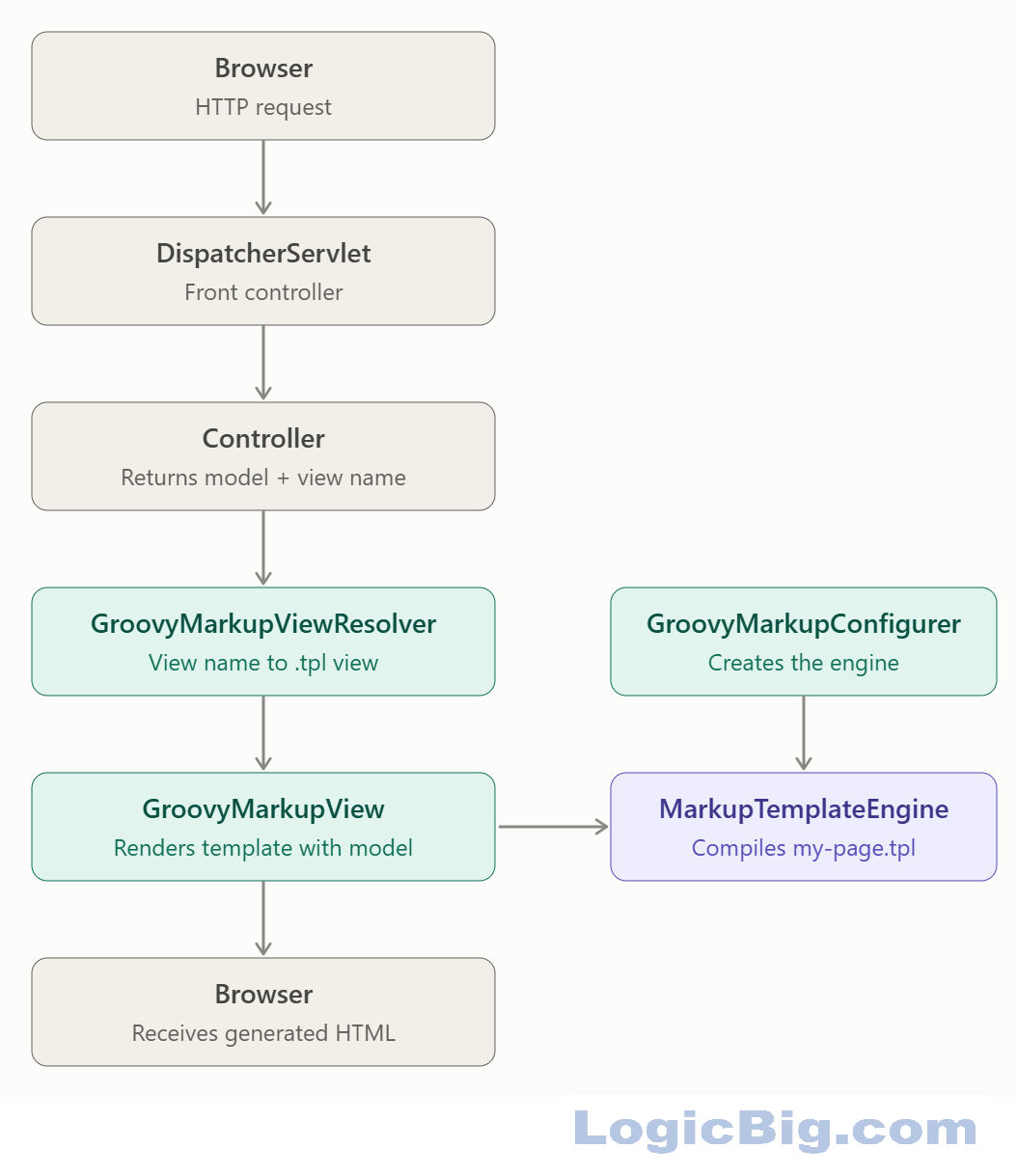
In above diagram, gray boxes are generic Spring MVC steps, teal boxes are Spring's Groovy view classes, and purple is Groovy's own template engine.
You can find more information about Groovy markup templates here.
To try examples, run embedded Jetty (configured in pom.xml of example project below):
mvn jetty:run Output
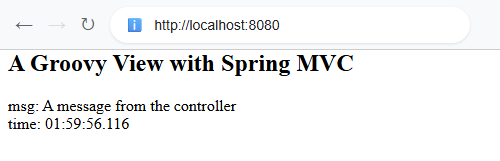 $ curl -s "http://localhost:8080"
<!DOCTYPE html><html lang='en'><head><meta http-equiv='"Content-Type" content="text/html; charset=utf-8"'/><title>My page</title></head><body><h2>A Groovy View with Spring MVC</h2><div>msg: A message from the controller</div><div>time: 01:59:56.116</div></body></html>
Example ProjectDependencies and Technologies Used: - spring-webmvc 7.0.6 (Spring Web MVC)
Version Compatibility: 4.1.0.RELEASE - 7.0.6 Version compatibilities of spring-webmvc with this example: Versions in green have been tested.
- groovy-templates 5.0.0 (Groovy: A powerful multi-faceted language for the JVM)
- jakarta.servlet-api 6.1.0 (Jakarta Servlet API documentation)
- JDK 25
- Maven 3.9.11
|