If an LLM is a "Brain" and RAG is a "Library," then an AI Agent is a "Worker." While a standard chatbot just talks, an Agent can reason and act. It is a system that uses an LLM to decide which tools to use to achieve a specific goal set by a developer.
Core Terms Explained Simply
1. Autonomy (The "Decision Maker")
In a normal app, the developer writes every "if/else" statement. In an Agentic system, the developer gives the AI a goal (e.g., "Help this user with their refund"), and the AI autonomously decides which steps to take to reach that goal.
2. Tools / Function Calling (The "Hands")
An LLM cannot naturally "see" your database or "send" an email. Tools are snippets of code (functions) that you give the AI permission to run. The AI doesn't run the code itself; it tells your system: "Please run the send_email function with these specific details."
3. Planning (The "Strategy")
Complex tasks require multiple steps. Planning is the Agent's ability to break a large goal into a "To-Do List." It thinks: "First I need to check the order status, then I need to check the refund policy, then I will notify the user."
4. Reasoning / ReAct (The "Thought Process")
ReAct (Reason + Act) is a common pattern where the Agent writes down its thoughts before taking an action. It looks like this: "I see the user is angry. Thought: I should check their order history before replying. Action: Call get_order_history."
Example: The Order App
Let's see how an Agent handles our "Order App" from previous tutorials.
The Goal
In this scenario, a user says: "My pizza from an hour ago never arrived, and I want my money back." Here is how the LLM and the Agent work together to solve the problem.
Step 1: Reasoning (The LLM Brain)
The LLM thinks: "The user is reporting a missing order and wants a refund. Before I can process a refund, I must verify the delivery status."
The LLM's Output: It generates a request to use the get_delivery_status tool for Order #123.
Step 2: Action (The Agent System)
The Agent acts: Your code sees the LLM's request and actually executes the function get_delivery_status(order_id="123") against your database.
Observation: The database returns: "Driver is stuck in traffic, 40 minutes delayed." This info is fed back into the LLM's context.
Step 3: Reasoning (The LLM Brain)
The LLM thinks: "The order is delayed by 40 minutes. Now I need to check our company policy to see if this specific delay qualifies for a refund."
The LLM's Output: It generates a request to search the RAG library for 'delay refund policy'.
Step 4: RAG Retrieval (The Agent System)
The Agent acts: The system performs a vector search in your policy documents.
Observation: The document found says: "Full refund is mandatory for delays over 30 minutes." This is handed back to the LLM.
Step 5: Final Execution (The Agent System)
The LLM thinks: "The delay (40m) exceeds the policy limit (30m). I must issue the refund and notify the user."
The Agent acts: Your code executes the issue_refund() function and sends the final confirmation message to the user's chat window.
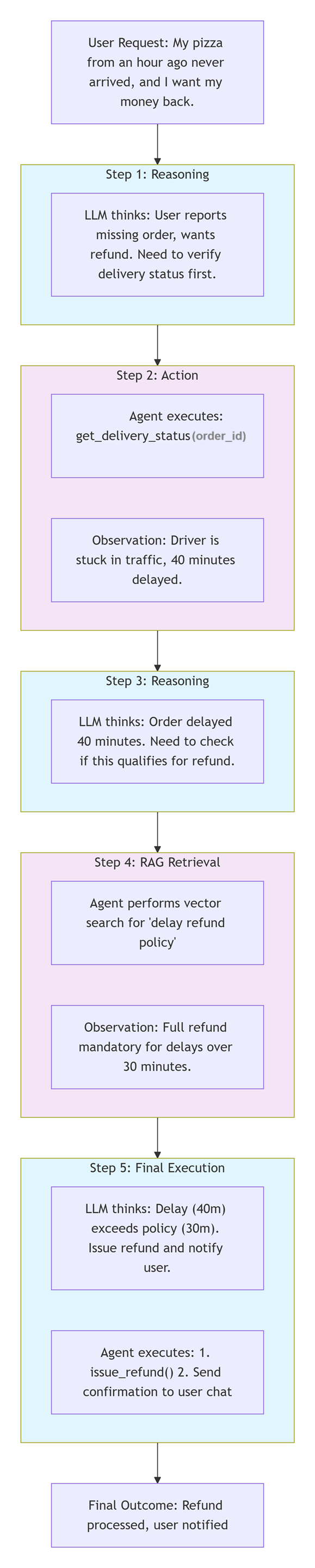
Greenish Blue boxes = LLM Reasoning steps (the "brain")
Purple boxes = Agent Action steps (system execution)
Why this matters for Developers
As a developer, you no longer have to code every possible path a conversation could take. Instead of a giant "Decision Tree" with thousands of lines of code, you build a Toolbox (small, reusable functions) and let the AI Agent decide which tool to grab and when to use it.
- Flexibility: The Agent can handle unexpected user requests that you didn't specifically program for.
- Tool Integration: You can connect your AI to any API (Stripe, Twilio, Slack, SQL) just by describing what the tool does.
- Problem Solving: If a tool fails, a good Agent can "think" of a workaround or ask the user for clarification.
|