Even the most powerful AI models have a major limitation: they only know what they were taught during their initial training. They don't know about your private files, your specific company data, or events that happened this morning. RAG (Retrieval-Augmented Generation) is the industry-standard way to give an AI "new eyes" so it can answer questions based on your specific data.
What is RAG?
RAG is a technique that gives the AI a "library" to look at before it answers a question. Instead of relying purely on its memory, the AI "retrieves" relevant documents from your database and "augments" its answer using that information.
The Three Simple Steps of RAG
- Retrieve: When a user asks a question, the system searches your private documents for the most relevant paragraphs.
- Augment: The system takes those paragraphs and attaches them to the user's original question as extra context.
- Generate: The AI reads the provided context and generates a natural language answer based only on that data.
The Problem RAG Solves: Hallucinations
Without RAG, if you ask an AI about a specific order that happened ten minutes ago, it might "hallucinate" (make up) a believable but fake answer because it doesn't have access to your database. RAG ensures the AI stays grounded in facts by forcing it to look at your "source of truth" before speaking.
Key Terms in the RAG Process
To build a RAG system, you need to understand four core concepts. Here they are explained in simple developer terms:
1. Embeddings (The "Coordinates")
Computers don't understand words; they understand numbers. An Embedding is a process that turns a sentence into a long list of numbers (a vector). Sentences with similar meanings will have numbers that are "mathematically close" to each other. For example, "The cat is on the mat" and "A feline is resting on the rug" will have very similar embeddings.
2. Vector Database (The "Smart Library")
A Vector Database is a specialized database that stores those numbers (embeddings). Unlike a traditional database that looks for exact word matches, a Vector DB finds "concepts." If you search for "refunds," it can find documents about "money back" or "returns" because it understands they are conceptually related.
3. Knowledge Cutoff (The "Expiry Date")
Every AI model has a Knowledge Cutoff—the date its training ended. If an LLM's cutoff is January 2024, it knows nothing about the world after that. RAG allows you to bypass this cutoff by providing the AI with the most recent information in real-time.
4. Grounding (The "Fact-Check")
Grounding is the practice of ensuring the AI's response is based strictly on the provided evidence. In a RAG system, we "ground" the AI in our retrieved documents so it doesn't wander off and use its general training data to answer specific business questions.
RAG Example
Let's return to our Order App from previous tutorials. Imagine a customer asks a question that is too specific for a general AI to know.
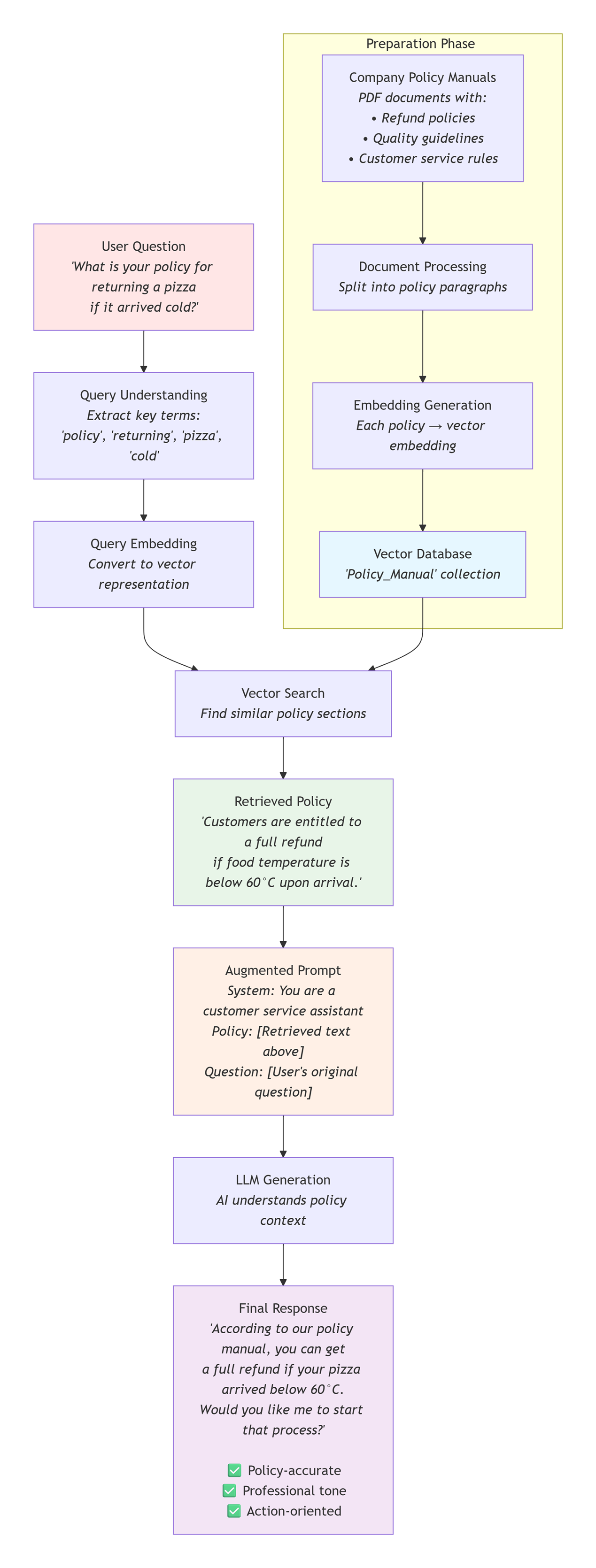
To understand the RAG workflow, we must first assume a Preparation Step: We have already converted our company's PDF manuals into Embeddings (mathematical numbers) and stored them in a Vector Database. Once that "Smart Library" is ready, the following execution steps happen in real-time.
The User Request
"What is your policy for returning a pizza if it arrived cold?"
The RAG Workflow (Behind the Scenes)
- Step 1: Retrieval The system searches the company's "Policy Manual" in the Vector Database. It finds a paragraph that says: "Customers are entitled to a full refund if food temperature is below 60°C upon arrival."
- Step 2: Augmentation
The system prepares a "hidden" prompt for the AI:
"Use the following policy to answer the user: [Policy: Refunds allowed if below 60°C]. User Question: What is your return policy for cold pizza?"
- Step 3: Generation
The AI reads the policy and answers: "According to our manual, you can get a full refund if your pizza arrived below 60°C. Would you like me to start that process?"
Why this helps the developer:
You didn't have to retrain the AI with your company policy. You just gave it a "cheat sheet" to read from. If your policy changes tomorrow to 50°C, you just update one document in your library, and the AI immediately starts giving the new answer.
|