Thymeleaf is a template engine. It takes an HTML template and fills it with data from our Java code. The result is a dynamic HTML page. Spring Boot supports Thymeleaf out of the box.
In this tutorial, we create a small Thymeleaf application and package it as an executable jar. This is the default packaging in Spring Boot. The application runs with an embedded Tomcat server. In the next tutorial, we will package the same application as a war file.
The only special folder is src/main/resources/templates. Spring Boot looks for Thymeleaf templates there. Unlike JSP (see this tutorial), we do not need a webapp folder, a JSP engine or JSTL.
plugins {
    java
    id("org.springframework.boot") version "4.1.2"
    id("io.spring.dependency-management") version "1.1.7"
}

println(">>> EXECUTING SCRIPT: build.gradle.kts (Kotlin DSL)")

group = "com.logicbig.example"
version = "1.0-SNAPSHOT"

java {
    sourceCompatibility = JavaVersion.VERSION_25
}

repositories {
    mavenCentral()
}

dependencies {
    implementation("org.springframework.boot:spring-boot-starter-web")
    implementation("org.springframework.boot:spring-boot-starter-thymeleaf")
}
plugins {
    id 'java'
    id 'org.springframework.boot' version '4.1.2'
    id 'io.spring.dependency-management' version '1.1.7'
}

println ">>> EXECUTING SCRIPT: build.gradle (Groovy DSL)"

group = 'com.logicbig.example'
version = '1.0-SNAPSHOT'

java {
    sourceCompatibility = JavaVersion.VERSION_25
}

repositories {
    mavenCentral()
}

dependencies {
    implementation 'org.springframework.boot:spring-boot-starter-web'
    implementation 'org.springframework.boot:spring-boot-starter-thymeleaf'
}
A Spring Boot project builds a jar by default, so no packaging setting is needed. We need two dependencies: the Spring MVC starter and the Thymeleaf starter.
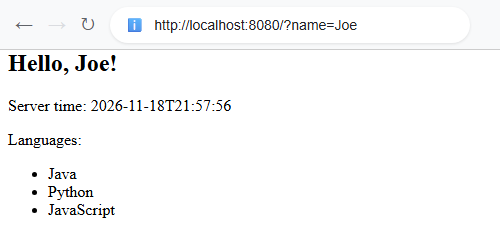
th:text replaces the text of the tag with a value. ${name} reads the "name" attribute from the model.
th:each repeats the tag for every item in a list.
The text inside the tags (like "Hello, someone!") is only sample text. Thymeleaf replaces it when the page runs. This is why Thymeleaf templates are called natural templates: we can open the file directly in a browser and it still shows a readable page.
The main class
package com.logicbig.example;

import org.springframework.boot.SpringApplication;
import org.springframework.boot.autoconfigure.SpringBootApplication;

@SpringBootApplication
public class ExampleMain {

    public static void main (String[] args) {
        SpringApplication.run(ExampleMain.class, args);
    }
}
Optional configuration
The defaults work without any configuration. The defaults are: templates in classpath:/templates/ and the file ending .html. During development, it helps to turn off the template cache, so we can edit a template and refresh the browser. File: src/main/resources/application.properties
spring.thymeleaf.cache=false
Remove this property (or set it back to true) in production.
Running the application
To run Spring Boot application you can run your main class from IDE, or execute it from the command line using your build tool:
JSPs do not work from an executable jar. Thymeleaf works from a jar and from a war.
JSPs need a JSP engine, which is only supported with Tomcat. Thymeleaf works with embedded Tomcat and embedded Jetty.
The Spring Boot documentation suggests avoid using JSP, choosing another template engine, like Thymeleaf, when we can.
Version history
Spring Boot 1.x: Thymeleaf 2 was the default, and it needed strict XML-style HTML. Thymeleaf 3 was possible only if we asked for it.
Spring Boot 2.x: Thymeleaf 3 became the default (with thymeleaf-spring5). It used the old javax.servlet API and Java 8+. The web starter was called spring-boot-starter-web.
Spring Boot 3.x: It needs Java 17 or newer. It uses jakarta.* packages (Servlet 6.0) and thymeleaf-spring6 with Thymeleaf 3.1.
Spring Boot 4.x (current): Spring Framework 7, Jakarta EE 11, Servlet 6.1, and Tomcat 11 as the embedded server. The web starter is now spring-boot-starter-webmvc. The Thymeleaf starter name is the same as before.
Example Project
Dependencies and Technologies Used:
Spring Boot 4.1.2 Corresponding Spring Framework Version 7.0.10 Version Compatibility: 2.0.0.RELEASE - 4.1.2Version List
×
Version compatibilities of spring-boot-starter-parent with this example:
2.0.0.RELEASE
2.0.1.RELEASE
2.0.2.RELEASE
2.0.3.RELEASE
2.0.4.RELEASE
2.0.5.RELEASE
2.0.6.RELEASE
2.0.7.RELEASE
2.0.8.RELEASE
2.0.9.RELEASE
2.1.0.RELEASE
2.1.1.RELEASE
2.1.2.RELEASE
2.1.3.RELEASE
2.1.4.RELEASE
2.1.5.RELEASE
2.1.6.RELEASE
2.1.7.RELEASE
2.1.8.RELEASE
2.1.9.RELEASE
2.1.10.RELEASE
2.1.11.RELEASE
2.1.12.RELEASE
2.1.13.RELEASE
2.1.14.RELEASE
2.1.15.RELEASE
2.1.16.RELEASE
2.1.17.RELEASE
2.1.18.RELEASE
2.2.0.RELEASE
2.2.1.RELEASE
2.2.2.RELEASE
2.2.3.RELEASE
2.2.4.RELEASE
2.2.5.RELEASE
2.2.6.RELEASE
2.2.7.RELEASE
2.2.8.RELEASE
2.2.9.RELEASE
2.2.10.RELEASE
2.2.11.RELEASE
2.2.12.RELEASE
2.2.13.RELEASE
2.3.0.RELEASE
2.3.1.RELEASE
2.3.2.RELEASE
2.3.3.RELEASE
2.3.4.RELEASE
2.3.5.RELEASE
2.3.6.RELEASE
2.3.7.RELEASE
2.3.8.RELEASE
2.3.9.RELEASE
2.3.10.RELEASE
2.3.11.RELEASE
2.3.12.RELEASE
2.4.0
2.4.1
2.4.2
2.4.3
2.4.4
2.4.5
2.4.6
2.4.7
2.4.8
2.4.9
2.4.10
2.4.11
2.4.12
2.4.13
2.5.0
2.5.1
2.5.2
2.5.3
2.5.4
2.5.5
2.5.6
2.5.7
2.5.8
2.5.9
2.5.10
2.5.11
2.5.12
2.5.13
2.5.14
2.5.15
2.6.0
2.6.1
2.6.2
2.6.3
2.6.4
2.6.5
2.6.6
2.6.7
2.6.8
2.6.9
2.6.10
2.6.11
2.6.12
2.6.13
2.6.14
2.6.15
2.7.0
2.7.1
2.7.2
2.7.3
2.7.4
2.7.5
2.7.6
2.7.7
2.7.8
2.7.9
2.7.10
2.7.11
2.7.12
2.7.13
2.7.14
2.7.15
2.7.16
2.7.17
2.7.18
Java 17 min
3.0.0
3.0.1
3.0.2
3.0.3
3.0.4
3.0.5
3.0.6
3.0.7
3.0.8
3.0.9
3.0.10
3.0.11
3.0.12
3.0.13
3.1.0
3.1.1
3.1.2
3.1.3
3.1.4
3.1.5
3.1.6
3.1.7
3.1.8
3.1.9
3.1.10
3.1.11
3.1.12
3.2.0
3.2.1
3.2.2
3.2.3
3.2.4
3.2.5
3.2.6
3.2.7
3.2.8
3.2.9
3.2.10
3.2.11
3.2.12
3.3.0
3.3.1
3.3.2
3.3.3
3.3.4
3.3.5
3.3.6
3.3.7
3.3.8
3.3.9
3.3.10
3.3.11
3.3.12
3.3.13
3.4.0
3.4.1
3.4.2
3.4.3
3.4.4
3.4.5
3.4.6
3.4.7
3.4.8
3.4.9
3.4.10
3.4.11
3.4.12
3.4.13
3.5.0
3.5.1
3.5.2
3.5.3
3.5.4
3.5.5
3.5.6
3.5.7
3.5.8
3.5.9
3.5.10
3.5.11
3.5.12
3.5.13
3.5.14
3.5.15
3.5.16
4.0.0
4.0.1
4.0.2
4.0.3
4.0.4
4.0.5
4.0.6
4.0.7
4.0.8
4.0.9
4.1.0
4.1.1
4.1.2
Versions in green have been tested.
spring-boot-starter-web (Starter for building web, including RESTful, applications using Spring MVC. Uses Tomcat as the default embedded container (deprecated in favor of spring-boot-starter-webmvc))
spring-boot-starter-thymeleaf (Starter for using Thymeleaf)
JDK 21
Build Tool:
Spring Boot - Hosting Thymeleaf using JAR packaging

 Output


