What is Spring Web MVC?
The Web Framework
Based on MVC pattern, it allows developers to build a web application with clear separation of concerns.
A web application is a dynamic client-server program where a browser (client) sends HTTP requests over the internet to a server running software (like Spring MVC), which processes the request and returns an HTML response to be displayed in the browser.
Let's understand each component in Spring Web MVC:
1. The Controller
A spring controller is a simple Java class created by the developer.
This class is typically annotated with @Controller on the class level.
The controller and/or its methods are mapped to request URI using @RequestMapping.
The controller's methods are usually known as handlers.
There can be multiple controller classes in an application.
A controller is registered as a bean. That means we can inject any other bean/service in the controller class.
The default scope of a controller is singleton.
A typical controller class looks like this:
@Controller
public class MyController {
    @RequestMapping(value = "/my-handler-path", method = RequestMethod.GET)
    public String myHandlerMethod(...) {
       .....
    }
}
We have to register the controllers as beans (either by scanning or explicit factory @Bean methods):
@Configuration
public class MyWebConfig {
    @Bean
    public MyController myController() {
        return new MyController();
    }
}
In above example the handler method returns String but that's not an absolute requirement.
The handler's method signature is very flexible. It can accept various type of parameters and return types, we will be exploring that in this series of tutorials.
2. The Model
org.springframework.ui.Model serves as MVC model.
It binds the view attributes with application specific values.
If a Spring MVC @Controller handler method declares a parameter of type Model (or ModelMap), Spring automatically creates and injects an instance of that model into the method.
@Controller
public class MyMvcController {
    @RequestMapping(value = "/my-uri-path")
    public String prepareView(Model model) {
       model.addAttribute("msg", "msg-value");
        .....
    }
}
3. The View
Generally speaking it's anything which implements org.springframework.web.servlet.View.
Spring framework comes with many views.
One commonly used view in Spring MVC is JstlView, which expects JSP resources to be available at the configured location (typically under the webapp directory in standard web projects). Consequently, the developer must provide the appropriate JSP file at that location.
A JSP file uses model's provided attribute. for example:
<%@ page language="java"
    contentType="text/html; charset=ISO-8859-1"
    pageEncoding="ISO-8859-1"%>
<html>
<body>
Message : ${msg}
</body>
</html>
Other components
What is ViewResolver?
ViewResolver is an interface.
The implementation of this interface is responsible to resolve views by name.
We don't have to implement it ourselves as there are already many view resolvers available.
One of the commonly used view resolvers is InternalResourceViewResolver, it's default View is JstlView, which can be changed.
We can configured multiple view resolver in an application.
We configure view resolver as a bean:
@Configuration
public class MyWebConfig {

    @Bean
    public ViewResolver viewResolver() {
        InternalResourceViewResolver viewResolver =
                      new InternalResourceViewResolver();

        viewResolver.setPrefix("/WEB-INF/views/");
        viewResolver.setSuffix(".jsp");
        return viewResolver;
    }
}
Per above configuration the Jstl resources must be located under /WEB-INF/views/ directory and must have file extension of jsp.
It's worth noting that JSP is considered a somewhat outdated technology for modern production applications, with most new projects opting for template engines like Thymeleaf or modern frontend frameworks. However, for learning Spring MVC fundamentals, JSP remains an excellent choice due to its simplicity, minimal configuration requirements, and straightforward approach to understanding how views work in the MVC pattern.
What is DispatcherServlet?
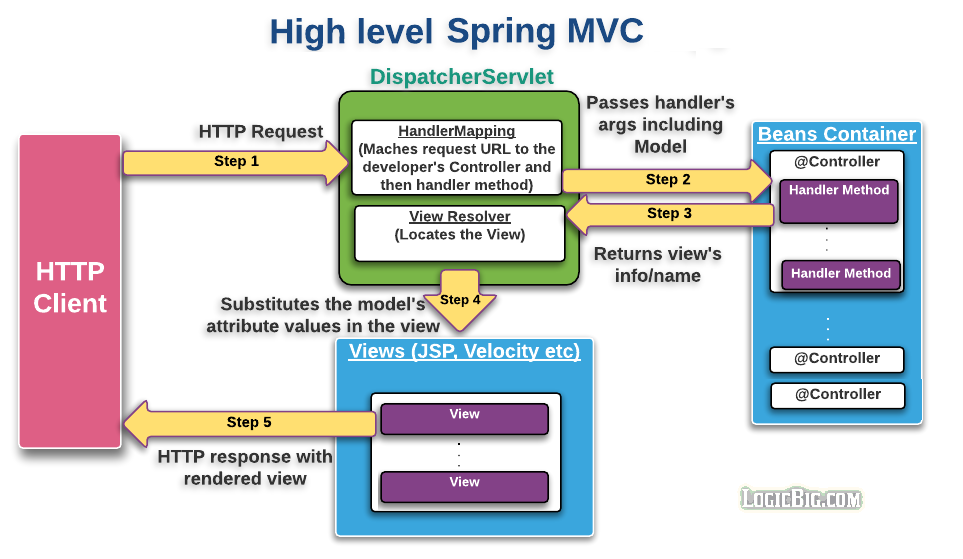
DispatcherServlet is the central front controller in the Spring Web MVC framework. It is request-driven and handles all incoming requests for a web application.
Here is the step-by-step workflow of how DispatcherServlet processes a request:
- Request Received: The
DispatcherServlet receives a request from a web client.
- Controller Lookup: It uses a
HandlerMapping object to match the requested URI to an appropriate controller.
- Handler Execution: The servlet invokes the chosen handler method. It also prepares and passes arguments to this method, such as an instance of
org.springframework.ui.Model.
- Model Preparation: The application-specific code inside the handler method executes the business logic, prepares the model data, and typically returns the logical name of a view back to the
DispatcherServlet.
- View Resolution: The servlet uses a
ViewResolver to locate the actual view based on the returned view name.
- View Rendering: The located view renders the response by substituting the model's attribute values.
- For JSPs, the
DispatcherServlet often delegates to the Servlet/JSP engine for processing.
- For other technologies like Velocity or XSLT, the view itself writes the content directly to the response stream.
Note: The view name returned is an internal selection for rendering and does not change the requested URL. The URL in the client's browser remains the same throughout this process.
What is WebApplicationInitializer?
In Servlet 3.0+, we can register DispatcherServlet programmatically as an alternative to using web.xml. WebApplicationInitializer is a Spring interface that allows us to configure the ServletContext programmatically. Spring internally uses the SpringServletContainerInitializer (which implements ServletContainerInitializer) to automatically detect and invoke all WebApplicationInitializer implementations during servlet container startup.
In the implementation of WebApplicationInitializer we typically register DispatcherServlet.
We also initiate the Spring container, AnnotationConfigWebApplicationContext along with registering the class annotated with @Configuration. Here's how the implementation will look like:
public class MyWebInitializer implements WebApplicationInitializer {

    @Override
    public void onStartup(ServletContext servletContext) throws ServletException {
        AnnotationConfigWebApplicationContext ctx =
                  new AnnotationConfigWebApplicationContext();
        ctx.register(MyWebConfig.class);
        ctx.setServletContext(servletContext);

        //using servlet 3 api to dynamically register
        //spring dispatcher servlet
        ServletRegistration.Dynamic servlet =
                  servletContext.addServlet("springDispatcherServlet",
                                            new DispatcherServlet(ctx));

        servlet.setLoadOnStartup(1);
        servlet.addMapping("/");
    }
What is AnnotationConfigWebApplicationContext?
AnnotationConfigWebApplicationContext is a Spring web application context (IoC container) that accepts annotated configuration classes, particularly @Configuration classes. It extends the standard Spring context with access to the ServletContext, making it suitable for web applications.
AnnotationConfigWebApplicationContext implements AnnotationConfigRegistry as well (just like <a href="../spring-core/quick-start.html#spring-core-context">AnnotationConfigApplicationContext</a>), so it accepts annotated classes as input, in particular @Configuration-annotated classes.
Complete Example
This is maven war project. As compared to our core spring examples, it includes new dependency of spring-webmvc which has transitive dependencies of spring-web and spring-context, so we don't have to include them.
pom.xml<project .....>
<modelVersion>4.0.0</modelVersion>
<groupId>com.logicbig.example</groupId>
<artifactId>spring-mvc-quick-start</artifactId>
<version>1.0-SNAPSHOT</version>
<packaging>war</packaging>
<dependencies>
<dependency>
<groupId>org.springframework</groupId>
<artifactId>spring-webmvc</artifactId>
<version>7.0.6</version>
</dependency>
<dependency>
<groupId>jakarta.servlet</groupId>
<artifactId>jakarta.servlet-api</artifactId>
<version>6.1.0</version>
<scope>provided</scope>
</dependency>
<dependency>
<groupId>org.glassfish.web</groupId>
<artifactId>jakarta.servlet.jsp.jstl</artifactId>
<version>3.0.1</version>
</dependency>
</dependencies>
<build>
<plugins>
<plugin>
<artifactId>maven-war-plugin</artifactId>
<version>3.5.1</version>
<configuration>
<failOnMissingWebXml>false</failOnMissingWebXml>
</configuration>
</plugin>
<plugin>
<artifactId>maven-compiler-plugin</artifactId>
<version>3.15.0</version>
<configuration>
<source>25</source>
<target>25</target>
<encoding>UTF-8</encoding>
</configuration>
</plugin>
<plugin>
<groupId>org.eclipse.jetty.ee11</groupId>
<artifactId>jetty-ee11-maven-plugin</artifactId>
<version>12.1.6</version>
<configuration>
<webApp>
<contextPath>/spring-mvc-quick-start</contextPath>
</webApp>
<stopPort>9966</stopPort>
<stopKey>foo</stopKey>
<httpConnector>
<port>8080</port>
<host>localhost</host>
</httpConnector>
</configuration>
</plugin>
</plugins>
</build>
</project>
As seen in above pom.xml, I've added the jetty maven plugin which is a embedded server. This allows us to bypass the need for an external Servlet container (like Tomcat) installation—simply running mvn jetty:run will start the server, and deploy our application instantly. It streamlines development by enabling quick testing and automatic reloading of changes directly from the console.
The Controller
package com.logicbig.example;

import org.springframework.stereotype.Controller;
import org.springframework.ui.Model;
import org.springframework.web.bind.annotation.RequestMapping;
import org.springframework.web.bind.annotation.RequestMethod;

@Controller
public class MyMvcController {

    @RequestMapping(value = "/", method = RequestMethod.GET)
    public String prepareView(Model model) {
        //bind msg variable to a value which our jsp view
        //will be using
        model.addAttribute("msg", "Spring quick start!!");
        //return  the name of our jsp page.
        return "my-page";
    }
}
The Config
package com.logicbig.example;

import org.springframework.context.annotation.Bean;
import org.springframework.context.annotation.Configuration;
import org.springframework.web.servlet.ViewResolver;
import org.springframework.web.servlet.view.InternalResourceViewResolver;

@Configuration
public class MyWebConfig {

    @Bean
    public ViewResolver viewResolver() {
        InternalResourceViewResolver viewResolver =
                new InternalResourceViewResolver();
        //commenting next line, setViewClass, as by
        // default the resolver's view is the same
        //viewResolver.setViewClass(JstlView.class);

        viewResolver.setPrefix("/WEB-INF/views/");
        viewResolver.setSuffix(".jsp");
        return viewResolver;
    }

    @Bean
    public MyMvcController myMvcController() {
        return new MyMvcController();
    }
}
WebApplicationInitializer Implementation
package com.logicbig.example;

import org.springframework.web.WebApplicationInitializer;
import org.springframework.web.context.support.AnnotationConfigWebApplicationContext;
import org.springframework.web.servlet.DispatcherServlet;

import jakarta.servlet.ServletContext;
import jakarta.servlet.ServletException;
import jakarta.servlet.ServletRegistration;

public class MyWebInitializer implements WebApplicationInitializer {

    @Override
    public void onStartup (ServletContext servletContext) throws ServletException {
        AnnotationConfigWebApplicationContext ctx =
                            new AnnotationConfigWebApplicationContext();
        //register our config class
        ctx.register(MyWebConfig.class);

        ctx.setServletContext(servletContext);

        //using servlet 3 api to dynamically create
        //spring dispatcher servlet
        ServletRegistration.Dynamic servlet =
                            servletContext.addServlet("springDispatcherServlet",
                                                      new DispatcherServlet(ctx));

        servlet.setLoadOnStartup(1);
        servlet.addMapping("/");
    }

}
Running the App
Running the embedded Jetty server and using curl as an HTTP client.
$ mvn clean compile jetty:run
$ curl -s http://localhost:8080/spring-mvc-quick-start/

<html>
<body>
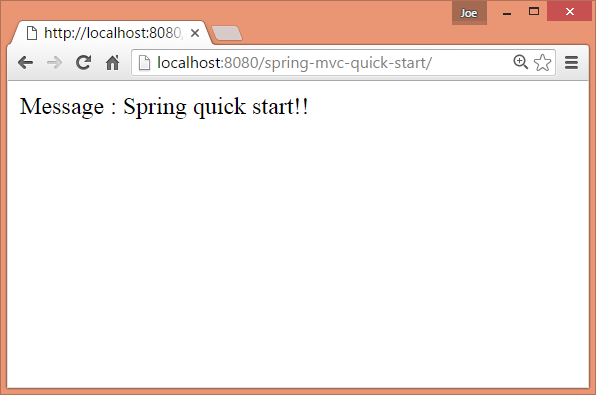
    Message : Spring quick start!!
</body>
</html>
Using browser:
Example ProjectDependencies and Technologies Used: - spring-webmvc 7.0.6 (Spring Web MVC)
Version Compatibility: 3.2.3.RELEASE - 7.0.6 Version compatibilities of spring-webmvc with this example: Versions in green have been tested.
- jakarta.servlet-api 6.1.0 (Jakarta Servlet API documentation)
- jakarta.servlet.jsp.jstl 3.0.1 (Jakarta Standard Tag Library Implementation)
- JDK 25
- Maven 3.9.11
|