Following example shows how to share cut/copy/paste actions between right click context menu and JMenuBar.
Example
package com.logicbig.example.common;

import javax.swing.*;
import javax.swing.text.DefaultEditorKit;
import javax.swing.text.JTextComponent;
import javax.swing.text.TextAction;
import java.awt.event.InputEvent;
import java.awt.event.KeyEvent;

public class CutCopyPastActionSupport {
    private JMenu jMenu;
    JPopupMenu popupMenu = new JPopupMenu();

    public CutCopyPastActionSupport() {
        init();
    }

    private void init() {
        jMenu = new JMenu("Edit");
        addAction(new DefaultEditorKit.CutAction(), KeyEvent.VK_X, "Cut" );
        addAction(new DefaultEditorKit.CopyAction(), KeyEvent.VK_C, "Copy" );
        addAction(new DefaultEditorKit.PasteAction(), KeyEvent.VK_V, "Paste" );
    }

    private void addAction(TextAction action, int key, String text) {
        action.putValue(AbstractAction.ACCELERATOR_KEY,
                KeyStroke.getKeyStroke(key, InputEvent.CTRL_DOWN_MASK));
        action.putValue(AbstractAction.NAME, text);
        jMenu.add(new JMenuItem(action));
        popupMenu.add(new JMenuItem(action));
    }

    public void setPopup(JTextComponent... components){
        if(components == null){
            return;
        }
        for (JTextComponent tc : components) {
            tc.setComponentPopupMenu(popupMenu);
        }
    }

    public JMenu getMenu() {
        return jMenu;
    }
}
Main class
public class CutCopyPasteExampleMain {
    public static void main(String[] args) {
        JTextArea ta = new JTextArea(5, 5);
        JTextField tf = new JTextField();
        ta.setText("The coding noses celebrated hours");
        tf.setText("random text");

        CutCopyPastActionSupport support = new CutCopyPastActionSupport();
        support.setPopup(ta, tf);

        JMenuBar menuBar = new JMenuBar();
        menuBar.add(support.getMenu());
        JFrame frame = createFrame("Cut Copy Paste Menu Example");
        frame.setJMenuBar(menuBar);

        frame.add(tf, BorderLayout.NORTH);
        frame.add(new JScrollPane(ta));
        frame.setVisible(true);
    }

    public static JFrame createFrame(String title) {
        JFrame frame = new JFrame(title);
        frame.setDefaultCloseOperation(JFrame.EXIT_ON_CLOSE);
        frame.setSize(new Dimension(800, 700));
        return frame;
    }
}
Output
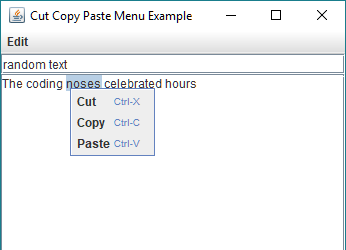
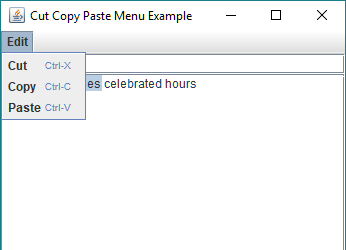
Right click menu and menu bar show all actions. Shortcut keys work as well.
Example ProjectDependencies and Technologies Used:
|
|