This tutorial demonstrates how to create a custom validator tag. With the custom tag, we can specify attributes as well which will map to the validator class properties.
Example
Creating a Validator
@FacesValidator("phValidator")
public class PhoneValidator implements Validator {
    private String pattern;

    @Override
    public void validate(FacesContext context, UIComponent component,
                         Object value) throws ValidatorException {
        PhonePattern phonePattern = PhonePattern.getPhonePattern(pattern);
        if (!phonePattern.match(value.toString())) {
            FacesMessage msg =
                    new FacesMessage("Invalid phone format",
                            String.format("invalid input: %s, The valid format regex: %s",
                                    value, phonePattern.getPattern()));
            msg.setSeverity(FacesMessage.SEVERITY_ERROR);
            throw new ValidatorException(msg);
        }
    }

    public String getPattern() {
        return pattern;
    }

    public void setPattern(String pattern) {
        this.pattern = pattern;
    }
}
public enum PhonePattern {
    STANDARD("(\\d{3})-(\\d{3})-(\\d{4})"),
    PLAIN("(\\d{3})(\\d{3})(\\d{4})");

    private final Pattern compiledPattern;

    PhonePattern(String pattern) {
        compiledPattern = Pattern.compile(pattern);
    }

    public static PhonePattern getPhonePattern(String patternString) {
        try {
            return valueOf(patternString.toUpperCase());
        } catch (IllegalArgumentException | NullPointerException e) {
            //returning default pattern;
            return STANDARD;
        }
    }

    public boolean match(String inputString) {
        Matcher matcher = compiledPattern.matcher(inputString);
        return matcher.matches();
    }

    public String getPattern() {
        return compiledPattern.pattern();
    }
}
Creating validator tag
src\main\webapp\WEB-INF\mylib.taglib.xml<?xml version="1.0" encoding="UTF-8"?>
<facelet-taglib
xmlns="http://java.sun.com/xml/ns/javaee"
xmlns:xsi="http://www.w3.org/2001/XMLSchema-instance"
xsi:schemaLocation="http://java.sun.com/xml/ns/javaee http://java.sun.com/xml/ns/javaee/web-facelettaglibrary_2_0.xsd"
version="2.0">
<namespace>http://example.com/ui</namespace>
<tag>
<tag-name>phoneValidator</tag-name>
<validator>
<validator-id>phValidator</validator-id>
</validator>
<attribute>
<name>pattern</name>
<type>java.lang.String</type>
</attribute>
</tag>
</facelet-taglib>
Registering the tag
src\main\webapp\WEB-INF\web.xml<web-app xmlns="http://xmlns.jcp.org/xml/ns/javaee"
xmlns:xsi="http://www.w3.org/2001/XMLSchema-instance"
xsi:schemaLocation="http://xmlns.jcp.org/xml/ns/javaee
http://xmlns.jcp.org/xml/ns/javaee/web-app_3_1.xsd" version="3.1">
<context-param>
<param-name>javax.faces.FACELETS_LIBRARIES</param-name>
<param-value>/WEB-INF/mylib.taglib.xml</param-value>
</context-param>
</web-app>
JSF page
src/main/webapp/index.xhtml<?xml version="1.0" encoding="UTF-8"?>
<!DOCTYPE html PUBLIC "-//W3C//DTD XHTML 1.0 Transitional//EN"
"http://www.w3.org/TR/xhtml1/DTD/xhtml1-transitional.dtd">
<html xmlns="http://www.w3.org/1999/xhtml"
xmlns:h="http://java.sun.com/jsf/html"
xmlns:u="http://example.com/ui">
<h:head></h:head>
<h:body>
<h2>JSF custom converter example</h2>
<h:form>
<h:panelGrid columns="3">
<h:outputLabel for="wph" value="Work Phone: "/>
<h:inputText id="wph" value="#{phoneBean.workPhone}">
<u:phoneValidator pattern="standard"/>
</h:inputText>
<h:message for="wph" style="color:red"/>
<h:outputLabel for="cph" value="Cell Phone: "/>
<h:inputText id="cph" value="#{phoneBean.cellPhone}">
<u:phoneValidator pattern="plain"/>
</h:inputText>
<h:message for="cph" style="color:red"/>
<span></span>
<h:commandButton value="Submit"/>
</h:panelGrid>
<div>
work Phone:
<h:outputText value="#{phoneBean.workPhone}"/>
</div>
<div>
Cell Phone:
<h:outputText value="#{phoneBean.cellPhone}"/>
</div>
</h:form>
</h:body>
</html>
Managed Bean
@ManagedBean
@ViewScoped
public class PhoneBean {
    private String workPhone;
    private String cellPhone;

    public String getWorkPhone() {
        return workPhone;
    }

    public void setWorkPhone(String workPhone) {
        this.workPhone = workPhone;
    }

    public String getCellPhone() {
        return cellPhone;
    }

    public void setCellPhone(String cellPhone) {
        this.cellPhone = cellPhone;
    }
}
To try examples, run embedded tomcat (configured in pom.xml of example project below):
mvn tomcat7:run-war Output
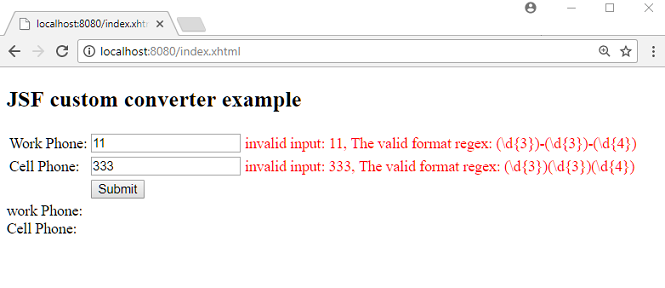
Submitting invalid patterns for phone number:
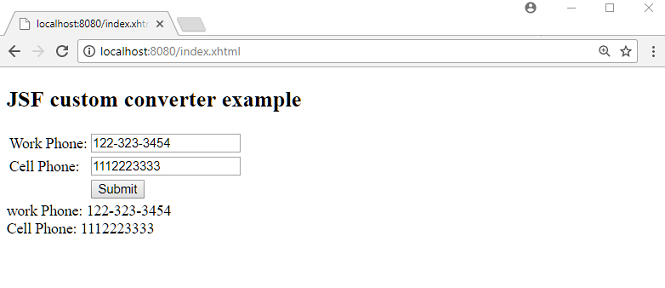
Submitting a valid patterns:
Example ProjectDependencies and Technologies Used: - jsf-api 2.2.14:
This is the master POM file for Oracle's Implementation of the JSF 2.2 Specification.
- jsf-impl 2.2.14:
This is the master POM file for Oracle's Implementation of the JSF 2.2 Specification.
- JDK 1.8
- Maven 3.3.9
|